
Design a Messaging Application like WhatsApp (Part 1)
Design a 1:1 and group messaging app

Welcome to the 55 new subscribers who have joined us since last week.
If you aren’t subscribed yet, join 1000+ engineers and technical managers learning Advanced System Design.
Messaging applications are among the most demanding systems to design. Users expect messages to be delivered instantly, available across all their devices, and retrievable years later — all while supporting millions of concurrent users.
To meet these expectations, a messaging platform typically balances four pillars: real-time delivery, clear message types, historical storage, and delayed delivery. Let’s walk through how each fits into the overall design.
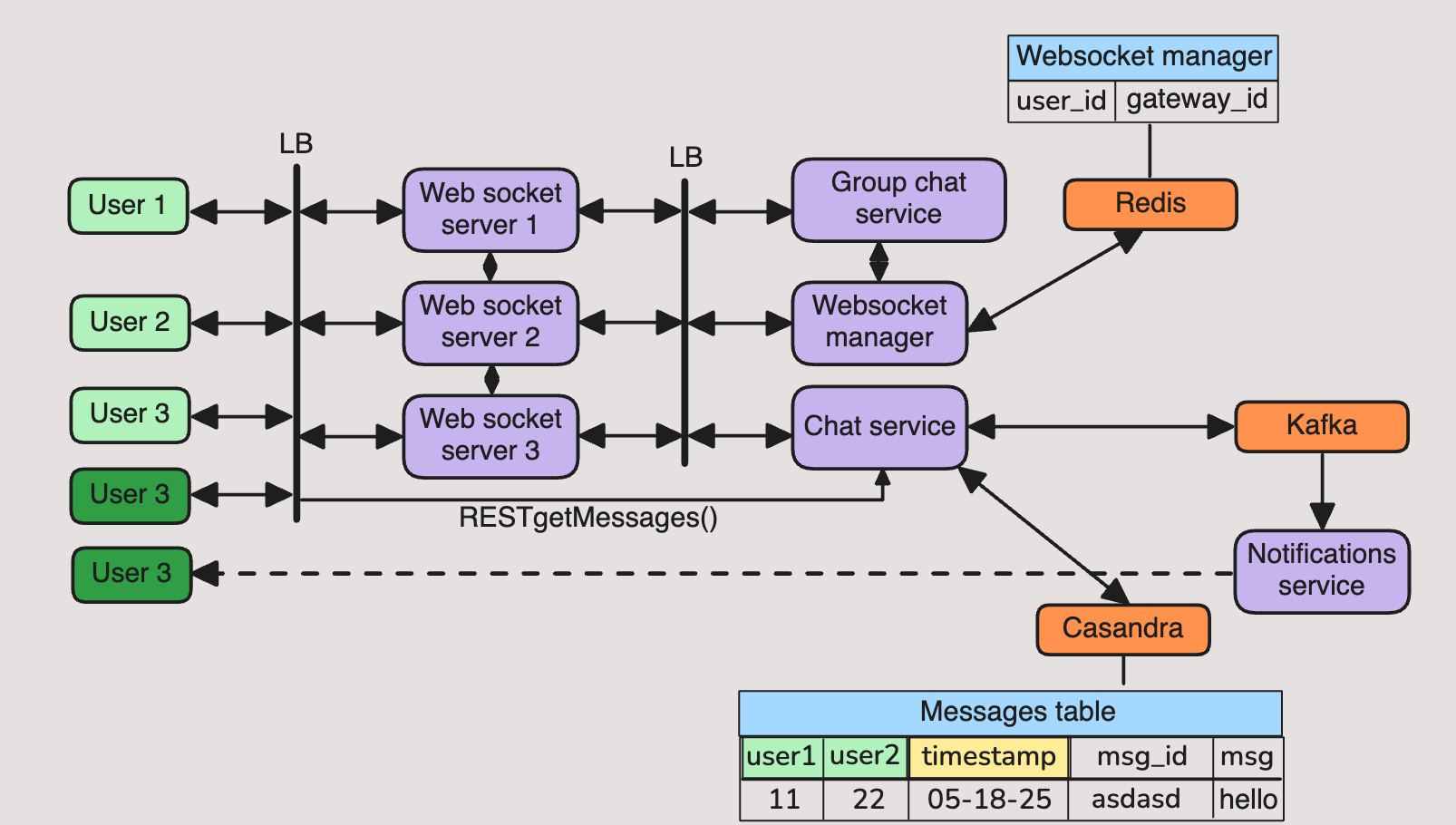
Real-Time 1:1 Messaging with WebSockets and Redis
The cornerstone of any modern messaging application is real-time delivery. Users expect their message to appear almost instantly on the recipient’s screen.
WebSockets for connectivity:
Each client (mobile app, web client, desktop app) maintains a persistent WebSocket connection to the backend. Unlike HTTP polling or long-polling, WebSockets are efficient and reduce latency because messages flow in both directions over a single, long-lived connection.WebSocket Manager service:
To support millions of users, we can’t keep all connection state in a single server. Instead, each application server is responsible for maintaining connections to a subset of users. A WebSocket Manager keeps track of which server each user is connected to.Redis as a global connection directory:
Redis is used as a shared, in-memory datastore to store mappings between user IDs and the servers that hold their WebSocket sessions. For example:
user123 → serverA:socket42
This enables any backend service to quickly find out where a user is connected, even if the user is on a different server.
Message routing:
When user A sends a message to user B, the backend looks up B’s active connection in Redis. If B is online, the system routes the message through the correct server and down the right WebSocket. If B is offline, the message is persisted to storage (see Cassandra below), and B will receive it later when reconnecting.Scalability benefit:
This design makes the system stateless at the application server layer. Servers can be added or removed without disrupting the ability to route messages, because the authoritative mapping lives in Redis.
Types of Messages: User Messages vs. System Messages
Messaging systems often carry more than just user chat. They also need to communicate events and system-generated content.
User messages:
These are the standard communications: text, emojis, images, voice notes, files, and reactions. They come directly from the user’s device and are delivered to one or more recipients.System messages:
Generated by the backend, these convey events such as:“You were added to the conversation.”
“Message deleted by sender.”
“Your session expired; please log in again.”
“This device has been disconnected because you signed in elsewhere.”
Why separate them:
By distinguishing between user and system messages, the client can handle them differently in the UI (for example, rendering system messages in gray text). The backend also enforces strict validation — only servers can create system messages, preventing spoofing or abuse.Consistency:
Both system and user messages flow through the same infrastructure: they are routed in real time when possible, stored in history for retrieval later, and acknowledged when delivered. This makes the system simpler, since it doesn’t need two entirely different pipelines.
Historical Message Storage
Beyond real-time delivery, a chat app must provide a complete conversation history so users can scroll back in time and never lose context.
Why Cassandra:
Cassandra is a distributed key-value store optimized for high write throughput and time-series style queries. Messaging is essentially an append-only workload: new messages are constantly added, and clients typically fetch recent ranges. Cassandra scales horizontally, which is critical for billions of messages.Data model (conceptual):
Each conversation acts as a partition, and messages are stored in order, keyed by their sequence number or timestamp. This allows efficient retrieval of the “latest N messages” or messages before/after a given point in the conversation.Inbox view:
To support “recent conversations” on the home screen, the system maintains a secondary table or index for each user that tracks their last message per conversation, unread counts, and timestamps.Benefits:
High write throughput: supports thousands of messages per second.
Efficient time-ordered reads: perfect for chat history.
Scalability: easily add nodes as the user base grows.
Delayed Message Delivery with Kafka
Some use cases require a message not to be delivered immediately. Examples:
A scheduled “send later” message.
Reminder notifications.
Marketing or system alerts sent at a defined time.
Why Kafka:
Kafka acts as a durable, scalable message bus that can buffer and process large volumes of events. It ensures messages are not lost and can be replayed if needed.Delay mechanism:
Messages that include a future delivery time are published into Kafka. A specialized service consumes these events, checks the scheduled time, and only forwards them to the real-time delivery pipeline when the clock reaches that time.Benefits of this approach:
Kafka guarantees durability and can handle massive backlogs if millions of delayed messages are scheduled.
Processing is resilient: if consumers crash, Kafka allows them to resume from where they left off.
Delayed delivery stays separate from the main message stream, preventing scheduling features from slowing down normal real-time chat.
Pulling It All Together
WebSockets + Redis → provides fast, reliable routing of messages between users, no matter which server they are connected to.
Message types → creates a clean separation between user-generated content and system-level events, simplifying client UX and backend validation.
Cassandra → ensures every message, whether user or system, is stored durably and can be retrieved later for conversation history.
Kafka → adds flexibility to handle delayed or scheduled messages without complicating the core real-time pipeline.
The result is a messaging system that is:
Real-time for live chat.
Reliable with durable history.
Flexible with support for both immediate and scheduled delivery.
Scalable to millions of users and billions of messages.
📣 I enjoyed reading the week
Must-Know Event-Driven Architectural Patterns on System Design Codex by Saurabh Dashora
Check out a more detailed video coverage on my Youtube.
Thank you for your continued support of my newsletter and the growth to a 1k+ members community 🙏